
Deploying Java applications packaged as JAR files does not always require a complex CI/CD pipeline. In many projects the typical approach is to push code to GitHub, trigger an automated build, create an artifact, and then deploy it to a server. While this workflow is powerful, it also introduces additional infrastructure, configuration overhead, and operational cost.
In some cases a much simpler solution is sufficient. Especially for one person team.
In this article I describe a low-cost and minimalistic approach for deploying JAR applications to an EC2 instance on AWS. The goal is not to build a full DevOps pipeline but rather to create a fast and predictable deployment mechanism that can be executed directly from the command line.
Big picture
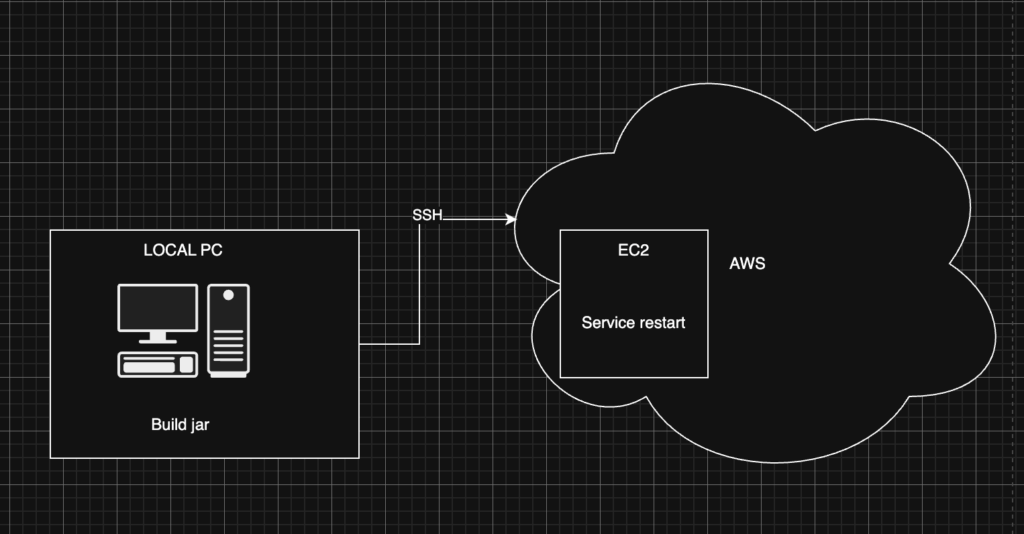
The architecture used in this setup is intentionally simple:
- a single EC2 instance on AWS
- a Java application packaged as a JAR
- deployment executed from the local machine via CLI script
- application managed as a systemd service
In my use case I explicitly wanted to avoid automatic builds triggered by GitHub pushes. Instead, I prefer to build the application locally and deploy the exact artifact that was tested on my machine. This gives full control over what is deployed and avoids additional CI infrastructure.
Server side preparation
Before implementing the deployment script, the EC2 server needs to be prepared so that it can reliably run the application. The preparation focuses on two things:
Jar directory
The application is stored under /opt/myapp. The /opt directory is traditionally used on Linux systems for optional or third-party software that is not part of the base operating system. This makes it a good location for custom deployed applications, and application.yml file.
Running the Application with systemd
To ensure the application runs reliably on the server, it is managed by systemd. systemd is the standard service manager used by most modern Linux distributions. It is responsible for starting services during system boot, monitoring them during runtime, and restarting them if something goes wrong. Instead of running the JAR manually, the application is defined as a systemd service.
The service configuration is stored in:
/etc/systemd/system/myapp.service
[Unit]
Description=My Java Application
After=network.target

[Service]
User=ec2-user
WorkingDirectory=/opt/myapp
ExecStart=/usr/bin/java -jar /opt/myapp/app.jar
Restart=no

[Install]
WantedBy=multi-user.target
With this setup in place, the server is ready to receive new application versions during deployment while ensuring the process is always properly managed by the operating system.
Running this on port 443 which is crucial for https connection require extra step. At this point I’ll skip this part.
…. Okay let’s forget about security as our goal is to be fast & cheap. Just run
sudo setcap 'cap_net_bind_service=+ep' /usr/bin/javaLocal PC side
Once the server is prepared, the deployment process can be executed directly from the developer’s machine. The idea is to keep the workflow extremely simple: build the application locally, transfer the artifact to the server, replace the existing version, and restart the service.
This process can be automated with a small CLI script.
#!/usr/bin/env bash
set -euo pipefail

EC2_IP=server.com
KEY_PATH=~/.ssh/key
JAR_FILE=../target/app.jar
REMOTE_DIR=/opt/myapp
APP_NAME=app.jar

echo "Building app..."
mvn clean package -DskipTests

if [[ -z "${JAR_FILE}" ]]; then
  echo "No jar found in target/"
  exit 1
fi

echo "Uploading ${JAR_FILE}..."
scp -i "$KEY_PATH" "$JAR_FILE" "${EC2_IP}:${REMOTE_DIR}/${APP_NAME}"

echo "Deploying on server..."
ssh -i "$SSH_KEY" "$EC2_HOST" <<EOF
  set -euo pipefail
  mv ${REMOTE_DIR}/app.jar.new ${REMOTE_DIR}/app.jar
  sudo systemctl restart ${SERVICE_NAME}
EOF

echo "Deployment finished."
Conslusion
And that’s it. Whenever a new deployment is needed, simply run the deployment script from the command line and the new version of the application will be built, uploaded, and restarted on the server.
Of course, in many production environments a more advanced setup is recommended. Using CI/CD pipelines, for example with GitHub Actions, combined with Docker-based deployments, provides strong benefits such as reproducible environments, automated testing, and more scalable deployment workflows.
Introducing a full CI/CD pipeline and containerization improves automation and reproducibility, but it also introduces additional costs.
GitHub Actions consumes compute minutes every time a workflow runs. Public repositories have some free quota, but private repositories can quickly exceed the included minutes, especially if builds include dependency downloads, tests, or container builds. Larger teams or frequent commits can noticeably increase usage.
Running Docker on EC2 also adds overhead. Containerized deployments typically require building images, storing them in a registry (for example Amazon ECR), and pulling them during deployment. This means additional compute usage during image builds, storage costs for container images, and network transfer when pulling images to instances.
For small services or personal infrastructure, these costs and the additional operational complexity may not justify the benefits. A simple artifact-based deployment using a JAR and a lightweight script can often be sufficient.
Leave a Reply